6-Step Guide to Insta-Worthy Outfit Shots

6-Step Guide to Insta-Worthy Outfit Shots

Get Insta-Ready: Make Every Outfit Pop

Capture outfits that stop the scroll. Plan outfits, find flattering light, pick clean backgrounds, pose with intent, shoot creatively, and edit thoughtfully. This six-step guide helps you make cohesive, eye-catching shots that highlight style and personality in every frame. Boldly.

What You’ll Need

Camera or smartphone
Tripod or self-timer
A few outfits and accessories
Access to varied locations and natural light
Basic posing sense
Simple photo-editing app
Best for Creators
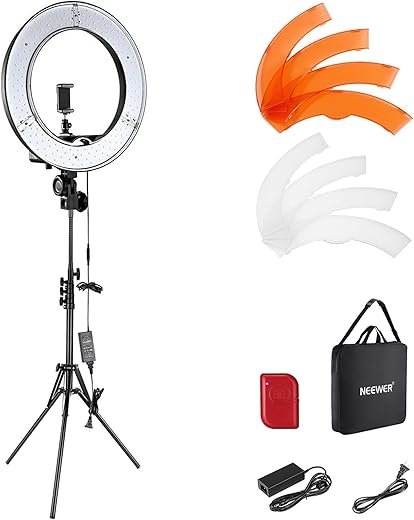
NEEWER 18-inch 5600K Professional Ring Light Kit
Dimmable 55W 5600K studio lighting
An 18-inch, 55W LED ring light kit with stand, phone holder, filters, and carry bag that provides bright, even 5600K illumination for photos and videos. Dimmable from 1–100% with low heat output, it’s ideal for makeup artists, streamers, and content creators who need portable studio lighting.

1

Plan Your Look Like a Pro

Why outfit planning beats last-minute panic — and how a little prep saves your feed.

Start by choosing a focal piece — a statement jacket, dress, or standout shoes — and build a cohesive palette around it. Mix textures and proportions to add visual interest and avoid clutter.

Pick a focal piece: statement jacket, standout dress, or bold shoes.
Build a palette: 2–3 complementary colors.
Mix textures & proportions: chunky knit + sleek leather, oversized coat + slim pants.
Limit patterns & accessories: choose 1–2 pieces that enhance, not compete.
Lay outfits out & snap: take quick phone photos to preview combos.

For example, pair a red leather jacket with neutral knit and slim jeans, or balance a voluminous skirt with a fitted top. Planning reduces shoot time, keeps shots consistent, and helps you tell a clear style story.

Must-Have
Women's Deep V Ruched Bodycon Mini Dress
Figure-flattering ruched design for evening wear
A stretchy, ruched bodycon mini dress with a deep V-neck that hugs curves and hides tummy areas for a slimming look. Comfortable and versatile, it’s suitable for parties, dates, and nights out.

2

Find Flattering Light

Natural light is free beauty lighting — learn where and when it flatters you most.

Scout light first: golden hour gives warm, soft tones; open shade and window light offer even illumination without harsh shadows. Avoid overhead noon sun that creates unflattering contrast.

Place your subject in soft, even light. For example, shoot a flowing dress with the sun behind your model at sunset for an ethereal halo, or photograph textured knits in open shade to preserve detail.

Use backlight for rim light and mood, and bring a reflector or white surface to bounce light into shadows. Learn your camera’s exposure controls and lock exposure on faces or key clothing elements so colors stay true.

Golden hour: warm, soft, flattering.
Open shade / window: even, detail-friendly.
Avoid noon sun: harsh shadows, blown highlights.
Backlight + reflector: halo + filled shadows.
Lock exposure: keep skin and fabric accurate.
Best Value
UBeesize 12-inch Selfie Ring Light Kit with Tripod
Adjustable color temps and extendable tripod
A 12-inch LED ring light with 240 LEDs, five color temperatures and ten brightness levels, paired with a tripod that extends to 62 inches and converts to a selfie stick. The kit includes a phone holder and Bluetooth remote for easy streaming, vlogging, and video calls.

3

Choose a Picture-Perfect Background

Boring backgrounds kill looks — use contrast, patterns, and negative space to make outfits sing.

Match background to your outfit: use neutral walls or textured surfaces to make bold colors pop. Place colorful looks against pale concrete or brick; layer knits on wood or plaster to show texture.

Use urban murals to add personality — but test the palette first. Avoid pairing small-print garments with busy patterns; a tiny floral dress will disappear against mosaic tile.

Mind scale: large shapes suit bold prints; small patterns need simple backdrops.
Use negative space: step back and leave empty sky or wall to create editorial vibes.
Create depth: include a blurred foreground or a distant background for silhouette emphasis.
Practical tips: clear clutter, check for color clashes, and position the subject several feet from the background for pleasing blur.
Pro Studio Kit
NEEWER Complete Studio Lighting and Backdrop Kit
Includes lights, softboxes, umbrellas, and backdrops
A full continuous lighting set with multiple 24W 5700K LED bulbs, softboxes, umbrellas, stands, and three large polyester backdrops (black, white, green) plus clamps and carry bags. It delivers even, daylight-balanced illumination and a complete setup for photography and video production.

4

Pose with Purpose

Stop posing like a mannequin — try movement, angles, and micro-gestures that flatter your silhouette.

Shift your weight to the back leg to create curves and lengthen your silhouette. Angle your shoulders away from the camera and tilt your chin for instant dimension.

Create subtle S-curves: pop a hip, bend the front knee, and keep elbows lifted a touch to avoid flattened arms. Use hands to show accessories—slide fingers into a pocket, touch a necklace, or frame your face.

Weight: back leg for curves.
Arms: keep elbows lifted slightly.
Movement: walk, twirl, or adjust a jacket.

Think weight distribution: put weight on the back leg to create curves. Use subtle S-curves, bend knees slightly, and angle shoulders away from the camera. Keep elbows lifted a bit to avoid flattened arms. Incorporate movement—walk, twirl, or adjust a jacket—to capture natural moments. Use hands to show accessories or frame the face, and practice a few signature poses in front of a mirror so you feel confident and consistent.

Best for Vlogging
SENSYNE 62-inch Phone Tripod and Selfie Stick
Extendable tripod with wireless remote control
A versatile 62-inch tripod that doubles as a selfie stick, with 360° rotation and a universal phone holder compatible with most smartphones and cameras. Comes with a wireless remote shutter for easy hands-free photos and videos.

5

Frame, Shoot, and Experiment

Composition tricks top creators swear by — crop tight, use leading lines, and shoot from unexpected heights.

Vary framing: shoot full-body to show proportions, mid-shots for outfit lines, and tight detail shots for textures, jewelry, and hardware. Shoot one of each to tell the full story.

Use composition rules and play with angles:

Use the rule of thirds to place your subject off-center.
Use leading lines (stairs, rails, shadows) to draw the eye.
Try low angles for dramatic silhouettes and high angles for a relaxed, editorial feel.

Use a tripod, set a self-timer or remote, and take many variations—different poses, distances, and focal lengths (e.g., 35mm for context, 85mm for compression). Experiment liberally: unexpected crops and motion blur often become the most shareable images.

Pro Choice
VICTIV 74-inch Professional Aluminum Camera Tripod
Tall, sturdy tripod with 3-way pan head
A lightweight yet sturdy aluminum tripod that extends from 19 to 74 inches, supports up to 9.5 lb, and includes a 3-way pan head for smooth panning and vertical shots. It comes with a phone holder, quick release plate, and carry bag for outdoor and studio use.

6

Edit Like a Pro (Without Overdoing It)

Good editing lifts an outfit; heavy filters crush it — aim for subtlety and a consistent feed style.

Start with basic fixes: crop for composition, adjust exposure and contrast, and correct white balance so garments look true (e.g., remove yellow streetlight casts).

Adjust key settings and use local tools: enhance colors selectively—try +8–15 vibrance on a muted dress, not +40—sharpen fine details like seams and hardware, and dodge faces or eyes slightly to brighten them without whitening skin unnaturally.

Crop to strengthen composition (rule of thirds).
Adjust exposure, contrast, and white balance.
Enhance saturation/vibrance sparingly.
Use local brushes to remove distractions or lift shadows.

Apply a consistent preset or gentle color grade to unify your feed. Export high-res JPEGs in sRGB (Instagram: 1080 px on the longest side, quality 80–90%) to preserve color and detail.


Ready, Set, Post!

Combine planning, light, background, posing, composition, and tasteful edits to create consistent, scroll-stopping outfit shots; practice, review, and refine your process until you develop a signature Insta look. Try it, share your favorite shot, and tag us to inspire others.

«
»

48 responses to “6-Step Guide to Insta-Worthy Outfit Shots”

  1. Marcus Hill Avatar
    Marcus Hill

    Not gonna lie, I skimmed ‘Edit like a Pro’ and panicked a bit. Filters are addictive.
    Does anyone have a go-to subtle preset? I want consistency across my feed without looking like a VSCO clone.

    1. Emily Park Avatar
      Emily Park

      I made a preset that adds +0.2 exposure, +8 contrast, -5 highlights, +3 warmth. It’s subtle but ties my photos together.

    2. Noah Brooks Avatar
      Noah Brooks

      Try tone curve gentle S-shape for a little pop. But don’t crush the blacks too much unless that’s the vibe.

    3. Ava Wilson Avatar

      Start with small adjustments: exposure, contrast, and a tiny saturation tweak. Save a custom preset with those slight moves. Consistency > dramatic changes.

  2. Javier Morales Avatar
    Javier Morales

    LOL the ‘pose with purpose’ bit made me laugh. I used to just stand and stare at the camera like an awkward mannequin.
    Now I do small movements: tuck hair, look down, step forward. Way less stiff.
    Also, anyone else do ‘micro-expressions’ practice in the mirror? weird but effective.

    1. Emily Park Avatar
      Emily Park

      Try singing a line of a song while posing — makes expressions more natural 😂

    2. Ava Wilson Avatar

      Micro-expressions are great — subtle changes in gaze and mouth can tell a whole story. Glad the guide helped you loosen up!

    3. Sarah Blake Avatar
      Sarah Blake

      I practice smirks and soft smiles in the mirror. Works wonders for candid vibes.

    4. Liam O'Neill Avatar
      Liam O’Neill

      Haha singing method. Also, walking towards the camera slowly makes for great movement shots.

  3. Priya Patel Avatar
    Priya Patel

    I appreciate the background section — sometimes my hallway looks like a thrift store exploded 😅
    Found that clean, textured walls + a plant = insta gold. Also, pro tip: use a small stool to vary heights and make the silhouette more interesting.

    1. Ava Wilson Avatar

      Yes! Height changes help a lot. Even just shifting one foot up on a curb or stair can create more dynamic lines.

    2. Liam O'Neill Avatar
      Liam O’Neill

      Stool trick is underrated. Also, shops with patterned tiles make great backgrounds (ask permission!).

  4. Olivia Reed Avatar
    Olivia Reed

    Tiny rant: people who over-edit to the point where skin looks plastic make me cringe. The ‘without overdoing it’ section was my favorite — subtlety is underrated.
    Also, can we normalize showing wrinkles? Clothes look better on real people lol

    1. Marcus Hill Avatar
      Marcus Hill

      Agreed. My rule: if I can tell it’s edited, I dial it back until it looks real again.

    2. Hannah Kim Avatar
      Hannah Kim

      100% — texture is part of authenticity. Use tools like frequency separation sparingly if at all.

    3. Ava Wilson Avatar

      Preach. Editing should enhance, not erase. We’ll keep promoting natural edits in future posts.

  5. Mia Thompson Avatar
    Mia Thompson

    This guide made me actually schedule outfit shoots instead of random snaps. Small victory.
    One tiny edit suggestion: add more sample before/after edits so newbies can see subtle changes side-by-side.
    Thanks for writing it!

    1. Ava Wilson Avatar

      Great idea — we’ll include more before/after galleries in the next revision. Stoked you found the scheduling tip useful!

    2. Priya Patel Avatar
      Priya Patel

      Yes before/after visuals help a lot. Even just a slider would be helpful for seeing the difference.

  6. Liam O'Neill Avatar
    Liam O’Neill

    Background choice question: does busy city street count as ‘picture-perfect’ or is it too distracting? I love the energy but worried it’ll steal focus from the outfit.

    1. Ava Wilson Avatar

      Busy streets can work if you simplify the rest—solid-colored outfit or shallow depth of field to blur the background. Motion blur of pedestrians can also add energy without stealing focus.

    2. Javier Morales Avatar
      Javier Morales

      Agree. Use a wider aperture (lower f-stop) to blur people out. Or wait for a lull in the action and shoot then.

    3. Hannah Kim Avatar
      Hannah Kim

      I shoot in busy streets all the time — pick a single focal point (you) and keep accessories minimal. It helps the outfit stand out.

  7. Hannah Kim Avatar
    Hannah Kim

    Would love chapter links inside the guide — jumping to ‘Edit Like a Pro’ took too long on mobile. Small UX gripe.
    Otherwise, the step-by-step layout is clean and easy to follow. Loved the mini-examples.

    1. Ava Wilson Avatar

      Thanks for the UX note — we’ll add anchor links for each section in the next update to improve navigation.

    2. Olivia Reed Avatar
      Olivia Reed

      Yes anchors would be clutch. Especially when you’re mid-shoot and need to check a quick tip.

  8. Sarah Blake Avatar
    Sarah Blake

    Loved the lighting tips! I never realized golden hour can be so forgiving for outfits. Tried the side-light idea yesterday and my denim jacket actually looked… trendy? 😂
    Quick question: for indoor shots, do you recommend window light over ring lights? I don’t want that harsh studio vibe.

    1. Priya Patel Avatar
      Priya Patel

      If you’re into a moody vibe, ring light + darker background can be cool. But for most OOTD stuff, natural window light wins. 👍

    2. Tom Nguyen Avatar
      Tom Nguyen

      Agree with admin. Also move a bit away from the window to avoid super-strong side shadow unless that’s the look you’re after.

    3. Ava Wilson Avatar

      Totally—window light is usually softer and more flattering for outfits. Try shooting near a large window with sheer curtains; it diffuses light nicely. Ring lights can work for headshots but sometimes flatten textures.

  9. Tom Nguyen Avatar
    Tom Nguyen

    Okay so I usually overthink outfits for hours. This guide’s ‘Plan Your Look Like a Pro’ helped, especially the part about palettes.
    I made a little capsule combo for the week and it saved me so much time.
    Also tried the ‘pose with purpose’ tips — my mirror selfies actually look intentional now.
    Huge improvement, 10/10 would recommend to my roommate.
    (also the framing tips are gold)

    1. Marcus Hill Avatar
      Marcus Hill

      Would love to see your capsule combos. I always end up overpacking for ‘just a quick shoot’ 😂

    2. Zoe Carter Avatar
      Zoe Carter

      Same. My boyfriend thought I suddenly got better at taking pics; I was like, ‘no, it’s the guide’ lol.

    3. Ava Wilson Avatar

      Love to hear that! Capsule combos are a game-changer. If you want, share a pic and I can give a quick framing suggestion.

  10. Zoe Carter Avatar
    Zoe Carter

    Quick nitpick: the pose examples were great but I wish there were more for plus-size bodies. Felt a bit generic for some shapes.
    Otherwise loved the composition advice — the rule-of-thirds tip actually made me rethink a bunch of my shots.

    1. Olivia Reed Avatar
      Olivia Reed

      Yes! Poses that highlight curves and movement would be awesome. Also, rocking the breeze (fan or natural) makes everything look better 😂

    2. Ava Wilson Avatar

      Thanks for calling that out — totally valid. We’ll add more inclusive pose examples in the next update and include tips for different body types. Appreciate the feedback!

  11. Daniel Lee Avatar
    Daniel Lee

    Can someone explain the ‘frame, shoot, and experiment’ bit in plain English? I’m new to cameras and the terminology kinda lost me.
    Like: aperture, shutter speed… help!

    1. Mia Thompson Avatar
      Mia Thompson

      If you’re using a phone, ‘portrait’ mode handles aperture-ish effects for you. For manual control, apps like Lightroom Mobile give easy sliders.

    2. Noah Brooks Avatar
      Noah Brooks

      Also: experiment means try different angles, move the camera around you, try high/low shots. Sometimes the awkward angle is the best one.

    3. Ava Wilson Avatar

      Sure — in simple terms: aperture controls background blur (lower f-number = blurrier), shutter speed freezes or blurs motion (faster = freeze), and ISO brightens sensor (higher = more grain). For most outfit shots: wide aperture (e.g., f/2.8–f/5.6), moderate shutter speed to avoid blur, and keep ISO low if possible.

  12. Noah Brooks Avatar
    Noah Brooks

    Fun fact: I used the guide’s color palette tip and matched my shoes to a tiny detail in my bag. Felt very put-together.
    Also—any tips for shooting reflections? Mirrors, windows, puddles?

    1. Zoe Carter Avatar
      Zoe Carter

      Puddle shots at golden hour = cinematic. Get low and use continuous shooting to catch the perfect pose.

    2. Daniel Lee Avatar
      Daniel Lee

      For windows, shoot at a slight angle and use a wide aperture to blur background reflections. And clean glass helps 😂

    3. Ava Wilson Avatar

      Reflections are awesome for creative shots. For mirrors, mind your angles to avoid camera reflection. For puddles, low-angle shots work best; try a polarizer filter to control glare if you have one.

  13. Emily Park Avatar
    Emily Park

    Made a checklist from the guide and took my first mini shoot this weekend. Steps I followed:
    – Plan look (minimal palette)
    – Find light (late afternoon window)
    – Background: plain brick wall
    – Pose: candid walking shots
    – Frame: rule of thirds
    – Edit: tiny boost to clarity
    Results: surprisingly cohesive feed update! 😁

    1. Priya Patel Avatar
      Priya Patel

      Batch-editing is life-saving. Start with one reference photo, then sync settings across shots and tweak per image.

    2. Ava Wilson Avatar

      Yes! Love that you turned it into a checklist. If you want tips on batch-editing to speed things up, I can share a quick workflow.

Leave a Reply

Your email address will not be published. Required fields are marked *